
We are thrilled to announce the release of RenameIQ Pro 2.1 (Ultimate Edition). This isn't just a maintenance patch or a minor UI tweak—it is the single most significant overhaul of our AI engine since we launched two years ago. We've rebuilt the core classification architecture from the ground up, integrated local GPU acceleration, and introduced a "Training Mode" that finally puts the power of machine learning directly into your hands.
For those of you who have been with us since version 1.0, you know our mission: to eliminate the soul-crushing drudgery of manual file organization. With Version 2.1, we are moving one step closer to a fully autonomous digital workflow.
Whether you are a freelancer drowning in receipts, a law firm managing thousands of case files, or just a digital hoarder looking to clean up your hard drive, RenameIQ Pro 2.1 handles it all—faster, smarter, and more privately than ever before.
What is RenameIQ Pro?
If you are new to the RenameIQ family, let us catch you up. RenameIQ Pro is an advanced document automation tool designed for Windows. Think of it as a tireless digital clerk that lives on your computer.
Most people organize files by opening a PDF, reading the date, finding the vendor name (is it
"Amazon Marketplace" or just "Amazon"?), checking the invoice number, closing the PDF,
right-clicking the file, selecting "Rename", and typing out
2026-01-03 - Amazon - Inv #442.pdf. Then they repeat this 500 times.
RenameIQ replaces that entire loop with a single drag-and-drop action. It uses Optical Character
Recognition (OCR) and layout analysis to "read" your document, understand its context, and
rename it according to rules you define. It turns a folder of chaotic Scan_001.pdf
files into a pristine, searchable archive.

The Power of 8 Specialized AI Models
In previous versions, we used a "General Document" model. It was good, but it struggled with nuance. It sometimes confused a "Delivery Note" with an "Invoice" because they look remarkably similar—both have tables, dates, and addresses.
Version 2.1 introduces Context-Aware Classification. We have trained 8 separate lightweight models, each specialized for a specific document domain. When you load a file, RenameIQ first determines the type of document, and then applies the appropriate extractor.
1. The Finance Stack
This is our most robust model, trained on over 50,000 anonymized financial documents.
- Invoices: Extracts Invoice Date (distinguishing it from Order Date or Due Date), Invoice Number, Vendor Name, and Total Amount.
- Receipts: Handles thermal paper scans, crumpled layouts, and "Tip" lines.
- Purchase Orders: Identifies PO numbers to link with your internal systems.
2. The Legal Stack
Legal documents are text-heavy and lack the clear "Key: Value" structure of invoices. Our Legal Model uses Natural Language Processing (NLP) to understand the preamble of contracts.
- Agreements & NDAs: Extracts the "Effective Date" and the names of the "Parties" involved (e.g., "Between Company A and Company B").
- Employment Contracts: Identifies the Employee Name and Start Date.
3. The Logistics Stack
For e-commerce sellers and warehouse managers, separating shipping docs from billing docs is crucial.
- Delivery Notes: Focuses on "Ship Date" and "Tracking Number".
- Shipping Labels: Can read barcodes and tracking numbers even from low-quality label scans.
Key Feature Highlights in 2.1
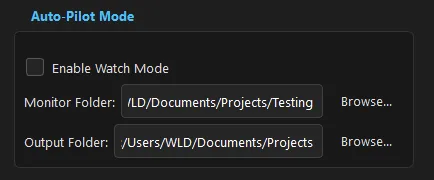
1. Auto-Pilot (The Folder Watcher)
This is the feature our community requested most. We realized that opening the app, dragging files in, and clicking "Start" was still too much work for some power users.
Auto-Pilot changes the game. You designate a folder on your computer—say, `C:\Users\You\Downloads\Invoices`. You minimize RenameIQ to the system tray. That's it.
Whenever you download a PDF or save a scan to that folder, RenameIQ wakes up, processes the file
in the background, renames it, and moves it to your archive folder. You don't even see it
happen. You just download a file named invoice_23423.pdf, and three seconds later,
it appears in your archive as 2026-01-03 - Adobe Creative Cloud - $54.99.pdf.
2. Training Mode (Custom Templates)
AI is smart, but it's not psychic. Sometimes a vendor uses a logo that looks just like abstract art, or they hide the invoice number in a footer with size 6 font.
In Version 2.1, we introduced Training Mode. If RenameIQ persistently fails on a specific document type, you don't have to wait for us to update the global model. You can teach it yourself.
- Right-click the failed file and select "Train Template".
- A visual editor opens.
- Draw a box around the Vendor Name. Draw another around the Date.
- Click Save.
The next time RenameIQ sees a document with that layout, it bypasses the general AI and uses your specific template. It's 100% accurate because you explicitly told it where to look.
3. The "Offline-First" Privacy Promise
We live in an era of data leaks. Every other "AI Tool" on the market works by taking your file, uploading it to an AWS or Azure cloud server, processing it on their GPU, and sending you back the text.
That is unacceptable for sensitive documents.
RenameIQ Pro 2.1 runs 100% offline. We use a quantified version of the LayoutLMv3 model that is optimized to run on consumer hardware. We bundle the entire inference engine inside the installer. When you drag a bank statement into RenameIQ, that data sits in your RAM, gets processed by your CPU/GPU, and is written back to your HDD. It never touches the internet. You can literally pull your ethernet cable out, and RenameIQ will work exactly the same.
System Configuration & Performance
Because we process everything locally, hardware matters more than with cloud tools. However, we have spent months optimizing the code (using ONNX Runtime and INT8 quantization) to make it fly even on modest laptops.
- Operating System: Windows 10 or Windows 11 (64-bit).
- Processor: Any modern Quad-core processor (Intel Core i3 8th gen or newer, AMD Ryzen 3 2000 series or newer) is recommended.
- RAM: 8 GB is the absolute minimum. 16 GB is recommended if you plan to use other apps while processing large batches. The AI models load into memory, taking up about 1.5GB of RAM.
- Graphics (Optional): If you have an NVIDIA GPU (GTX 1050 or higher), you can enable "GPU Acceleration" in settings. This can speed up OCR performance by 300-500%. However, the CPU mode is perfectly adequate for most users.
The Road Ahead
Release 2.1 is available today. But we aren't stopping here. In the coming months, we plan to introduce:
- Mac & Linux Support: We are rewriting our UI in a cross-platform framework.
- Multi-Step Workflows: e.g., "If Invoice > $1000, move to 'Review' folder; else move to 'Archive'".
- Email Integration: Directly monitor an Outlook folder for attachments.
Data organization is the foundation of a stress-free digital life. With RenameIQ Pro 2.1, we hope to give you back the hours you spend double-clicking and typing.
Ready to Upgrade?
Existing Pro users can update for free by clicking "Check for Updates" in the Help menu. New users can download the trial version below. It processes 50 files for free—enough to clean up your desktop and see the magic for yourself.